
Network Monitoring System NMS
Our Network Monitoring System (NMS) services are designed
to provide you with real-time visibility and control over your network infrastructure.
A Seamlessly Integrated
Component of Your Operations
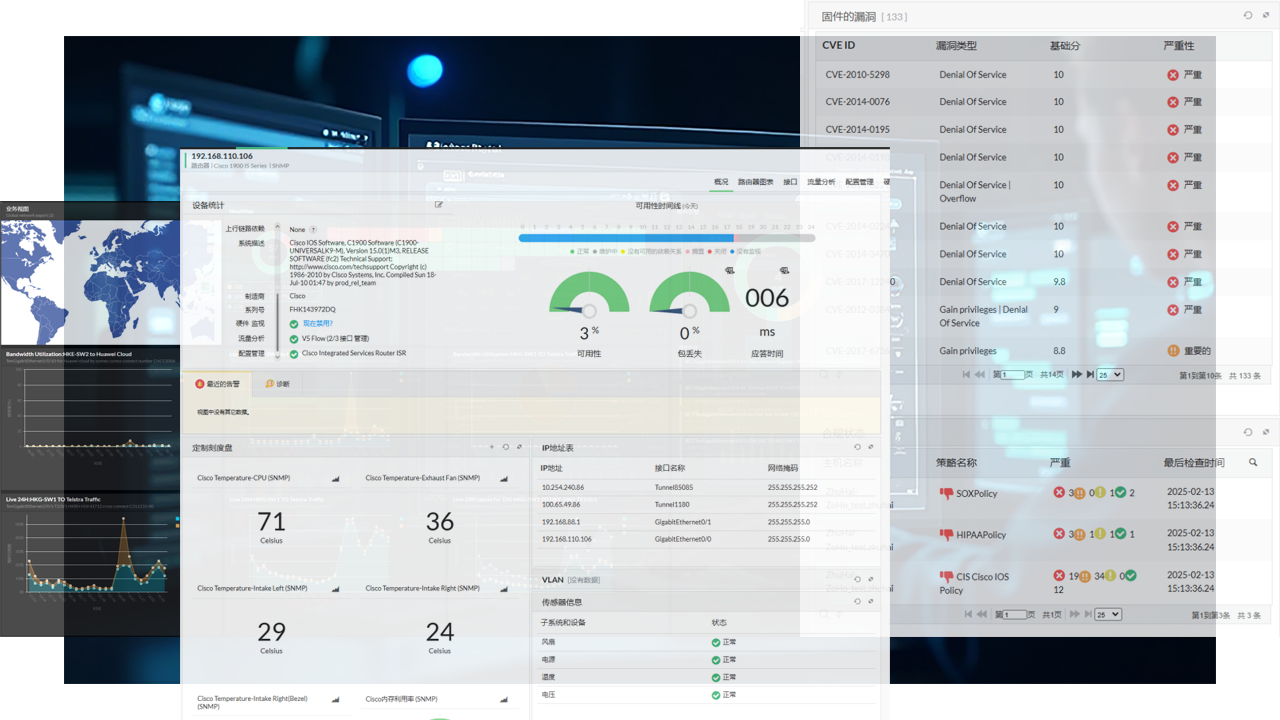
It provides handy but powerful Customizable Dashboards and CCTV views that display the immediate status of your devices, at-a-glance reports, business views etc.
NMS also provides a lot of out-of-the-box graphs and reports, which give a wealth of information to network administrators about the health of their networks, servers and applications.
NMS help you manage your network?
Our Features and Capabilities:
Unlocking Your Business Potential
Ensure optimal performance with real-time monitoring of your IT infrastructure.
Management
Optimize and allocate bandwidth effectively to enhance network performance.
Maintain and manage network configurations to ensure stability and security.
Management
Streamline operations with automated management solutions for efficiency and reliability.
and Port Management
Efficiently manage IP addresses and ports to maintain a secure and organized network environment
Infrastructure Performance Monitoring
– Device availability
– Available response time
– CPU, memory and disk
– Device errors and packet loss
– Network traffic, bandwidth
monitoring
– Identify performance problems caused by hardware errors
– Monitor power supply
- Monitor temperature
– Monitor voltage
– Monitor resource capacity
monitoring
– Monitor CPU, memory, and disk utilization
– Monitor Windows processes and services as well as TCP services
– Monitor Windows events through event ID
– Monitor file size, presence, quantity and modification
monitoring
– Firewall version, authorization, performance monitoring
– Keep a record of firewall configuration and changes
– Analyze security risks through firewall log visualization
monitoring
– Visualize WAN links
– Monitor Voip link jitter, delay, and packet loss
– Analyze historical trends Measuring and
improving availability planning
Address and Port Management
NMS provides a variety of tools commonly used by network and system administrators, including IP address management, switch port management, external device monitoring, IPAM and SPM reports, etc.
IP address administration
Actively discover, monitor and manage IPV4 and IPV6 addresses. Draw a tree analysis layer Scan the subnet to obtain IP status
Interface management
Automatically scan and identify ports
Monitor the flow status of the interface
Analyze interface traffic types. Configure interface availability threshold alerts
IPAM & SPM report
IPAM report: A report of available and used IP addresses in the network. SPM report: network port availability report, port utilization, speed and type, etc.
Bandwidth Management and Traffic Analysis
NMS collects and analyzes traffic from critical devices, helping you delve into traffic analysis and perform effective bandwidth management, providing detailed traffic reports. Supported device types: Cisco, H3C, Juniper, Ruijie, Sangfor, HP, Huawei, and other leading suppliers in the market. Supports protocols such as Netflow, Sflow, j-flow, IP fix, Netstream, and Appflow.
Bandwidth management
Determine the source of traffic consumption according to application, source and destination IP address, interface and protocol, adjust traffic through policy, and then predict future bandwidth capacity.
Flow analysis
Track application, device, and interface traffic to generate detailed views, and provide network path tracing and periodic performance analysis.
Network Configuration Management
Network configuration management is a comprehensive network device configuration change and compliance management solution that provides unified and centralized security management of network devices such as switches, routers, and firewalls.
Firmware vulnerability monitoring
Compliance management
Automated Administration
The NMS system supports custom configuration workflows. When triggering the status, process, application, file, etc., of custom devices, it runs custom internal alarm processing actions, external software processing actions or configuration actions, etc. For example, the following scenario:


Tiered Support
Tier-1
Support
Basic support and troubleshooting, such as password reset, printer configurations, break/fix instruc tions, ticket routing, and escalation to Tier-2 and Tier-3 support.
Tier-2
Support
Tier-3
Support
Innovative XaaS and
IT Management Solutions Architecture

Key Challenges Addressed by
Innovative XaaS and IT Management Solutions:

Rising Cyber
Threats
Protect exposed networks as businesses shift online, eliminating vulnerabilities with proactive threat detection.

Complex Tech Demands
Simplify operations with a unified platform that adapts to new technologies, reducing the burden on IT teams.

Workload Overload
Automate repetitive tasks like log analysis, configuration management, and performance tuning.

Skill Gaps
Leverage expert-driven solutions and a user-friendly portal to bridge talent shortages and standardize operations.
Smart essentials to make your ITSM wholesome
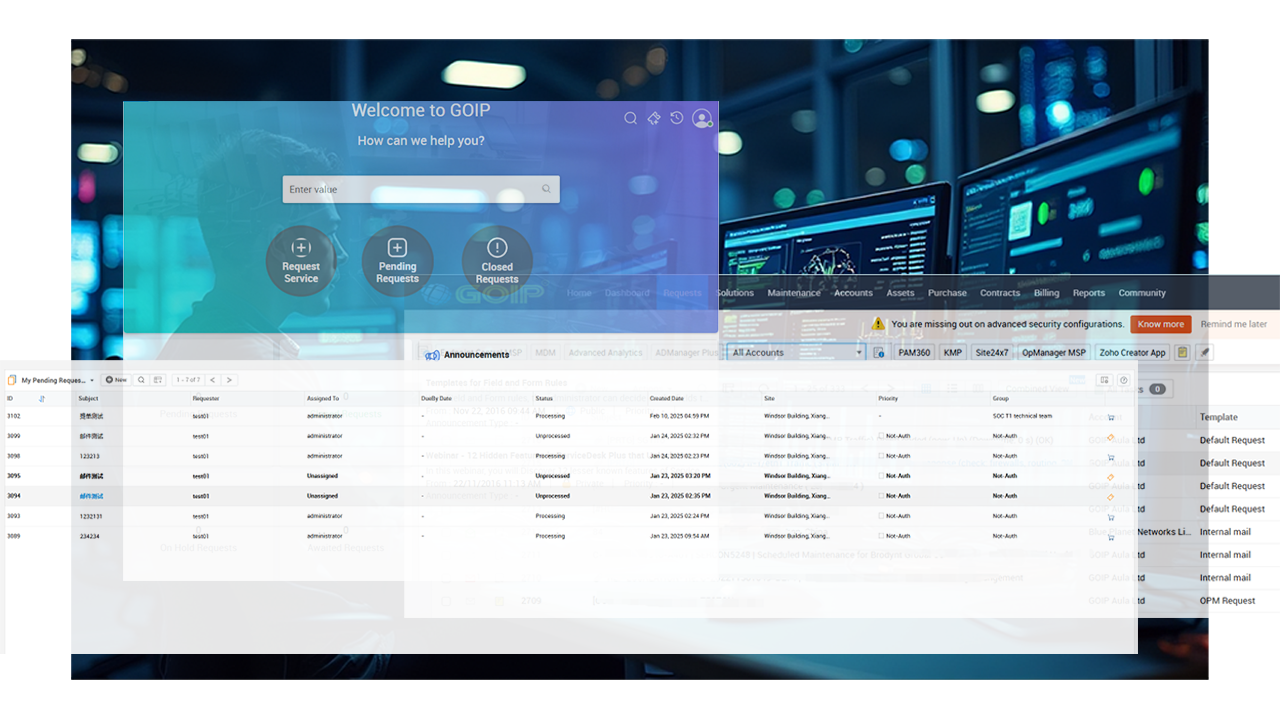
Make service management cross the boundary from IT to other business processes with the ITSM
ITSM Platform
Overview:
ITSM is the “heart” of the Innovative XaaS and IT Management Solutions, serving as the core platform for managing customer network issues and incident reporting effectively. It provides a standardized operational method for Innovative XaaS and IT Management Solutions.
Key Features:
24/7 Instant Ticket Creation and Response:
Experience rapid ticket creation and processing that aligns with customer service agreements. Receive updates via email, SMS, and WeChat, while also allowing for web-based ticket tracking and history retrieval.
Network Monitoring System (NMS)
Core Functionality:
The Network Monitoring System is the central feature of the Innovative XaaS and IT Management Solutions, focusing on the operational stability and security monitoring of network devices. With 24/7 monitoring of customer-connected devices, it triggers response rules for instant ticket creation, connecting engineers to resolve issues and inform users.
EventLog Analyzer Platform (ELA)
Security Analysis Tool:
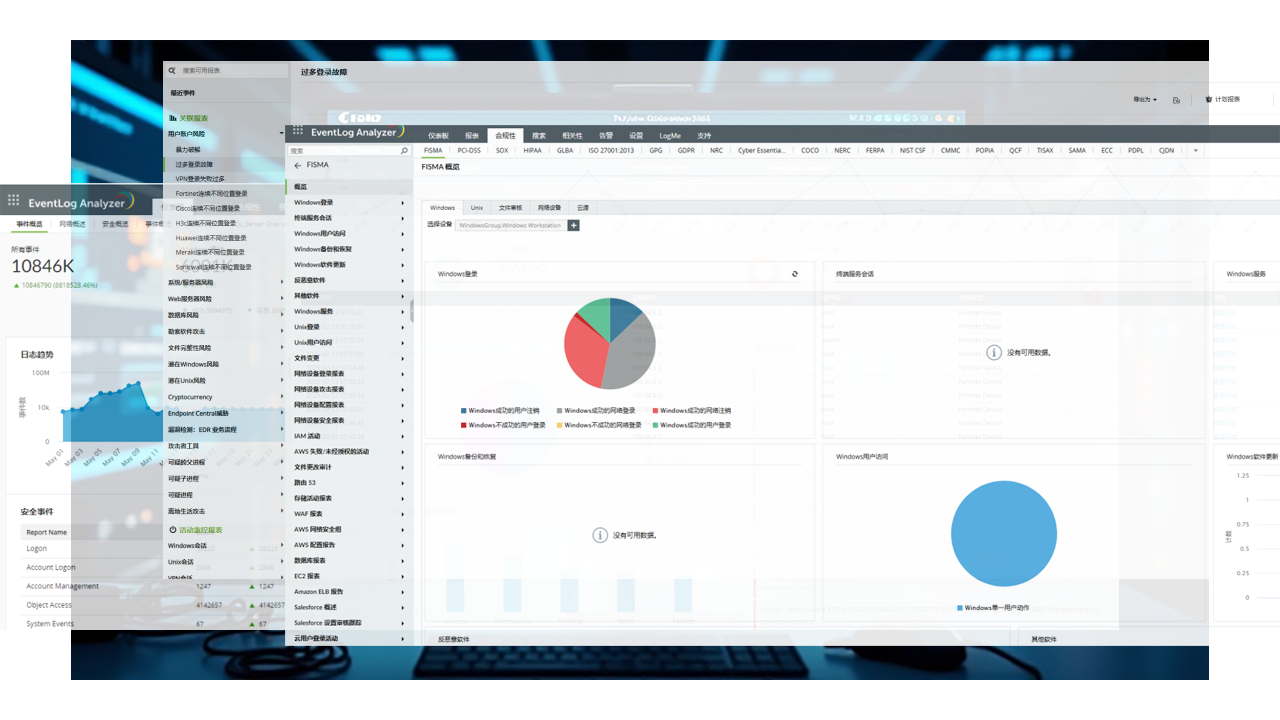
EventLog Analyzer Platform is a critical component of the S.NOC solution for network security analysis. It collects logs from servers, network devices, security equipment, and application systems to conduct thorough security assessments.
The platform offers compliance checks for network security and performs standard baseline security evaluations on devices. It integrates with the ITSM system to set response rules for instant ticket creation, facilitating timely issue resolution and user notifications.
Why Choose Innovative XaaS and IT Management Solutions?
Unlocking Your Business Potential
Continuous oversight of devices, traffic, and logs for instant anomaly detection.
Automate workflows, generate real-time reports, and resolve incidents faster.
Track every action with a dedicated dashboard for audits, compliance, and transparency.
Security
Stay ahead of threats with AI-driven analytics and adaptive response protocols.